What's New at Creditsafe

Find out about the latest enhancements to our products, data and platform.

December 2025

KYC Protect


  • You can now include sanction lists directly in batch uploads, and any screening preferences set in the application automatically apply during batch screening and monitoring.
  • Add or edit notes on individual screening and monitoring records, with support for up to 1,000 characters.
  • Full match reports can now be downloaded directly from AML Check results and from Business or Individual entity links, so that no investigation step is required.
  • Screening actions are now automatically assigned to the correct user based on who performs the activity or who owns the profile.
  • You can now provide a "Gender" value for individual or sole trader profiles. If specified, it will automatically be used for screening and monitoring.
  • The import process for UBOs and non-UBOs in NL company reports has been corrected. Any person or company not listed as a real UBO will now be imported as a key party. 
Ledger Insights


  • You can now customise the accounts receivable auto-response interval, allowing for custom payment cycles across credit groups.
  • A comments column has been added to meeting reports, making it easier for your credit groups to add notes and discuss entries in Excel during a meeting.
  • The matched address is now shown on the Accounts Receivable update page, helping members confirm organisations even with different trade names.
  • The Account Receivable Response form layout is improved for easy top-to-bottom completion using tab navigation, streamlining data entry.
  • A new contact type persona for credit groups has been added so you can receive meeting notifications in Ledger Insights. 
  • Credit group members can now view an organisation's corporate family tree within Ledger Insights, see its provenance from credit reports, and add connected customers with relevant trade payment details for each member.
  • A safe number will only appear once in a meeting list; previously, duplicate entries could occur when rematching companies.

Platform


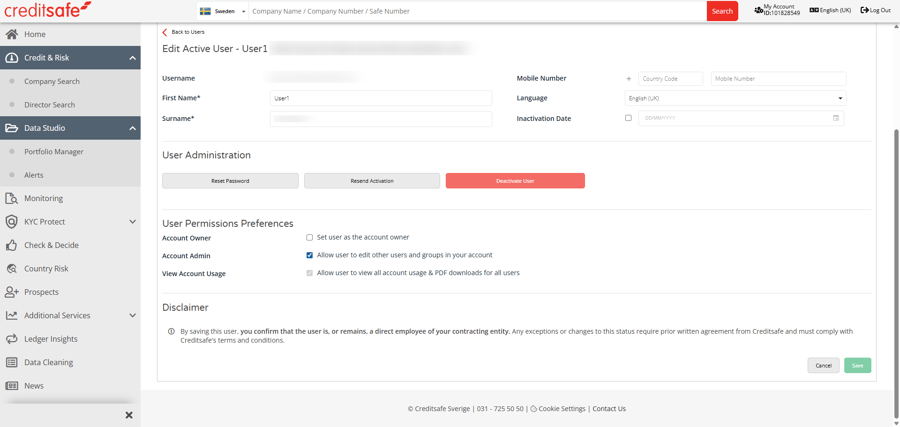
  • View archived PDFs for all users in your organisation by selecting one of the following user permission preferences: Account Owner, Account Admin or View Account Usage.
  • You can search and filter reports by User, Date Range, Country, or Company Name. 
plat